Branded mini programs
Tailor the brand interface and connect products, ordering and loyalty services, with QR and sharing access.
 AllinWebPOS
AllinWebPOS is a browser-based POS and store management system for retail and restaurants. Connect checkout, QR ordering, inventory, customer loyalty and multi-store workflows, with tailored customization, SaaS or private deployment.
Observe Real Tasks in Stores, Then Evaluate How Customers, Staff, and Managers Hand Off Responsibilities

Confirm cup size and notes at counter; production staff prepare drinks per order; verify items against customer needs at pickup.
Each role must see the next step; link ordering and pickup workflows.
Select Beverage, Cup Size, Temperature, and Add-ons; Verify Preparation Notes.
Confirm product, quantity, and pickup information; hand to production staff.
Prepare items per order; verify specifications and special requests.
Confirm Items Against Pickup Information, Complete Packaging and Delivery.

Fitting, invoicing, and size exchanges handled per specific SKU to ensure correct item delivery and accurate inventory tracking.
Customer-visible product variations must align with specifications in checkout and inventory systems.
Select Style, Color, and Size; Confirm Specific Items to Purchase.
Verify specifications, prices, and available stock via barcode or product profile.
Order Creation Completed; For Code Changes, Handle According to Original Order and Store Rules.
View quantities per specification using sales, returns/exchanges, and count records.

Confirm specifications, packaging, pickup times, and customer requests to ensure consistent prep, stocking, and counter delivery.
Verify each item from order specifications to delivered gift boxes.
Verify cake specifications, gift box combinations, pickup times, and special requests.
Arrange production and stock preparation based on confirmed information, and communicate packaging requirements.
Verify physical items, packaging, and order; hand over ready-to-pickup items to counter.
Confirm that picked products match the order; complete settlement and pickup.

Stores submit requests, headquarters confirms scope, warehouses prepare goods per transfer records—ensuring shipped and received quantities are verifiable.
Every transfer must track recipient, items shipped, and quantity received.
Organize specific products, specifications, and quantities based on sales and inventory.
Confirm Shipment Arrangements Based on Store Scope and Approval Roles.
Pick, Verify, and Record Sent Quantities Based on Transfer Records.
Verify received specifications and quantities; document discrepancies and assign handling.

Agree on product identification and inventory ownership first, then link orders, stock preparation, and shipping to ensure online demands enter clear fulfillment workflows.
Align product, order, and fulfillment roles first to clarify channel collaboration.
Clarify the access channels, product identifiers, and information required for order transmission.
Verify ordered items and stock levels per agreed inventory sources.
Verify specifications, quantities, and packaging requirements; prepare deliverable items.
Verify delivery and shipping details per channel plan, and follow up on abnormal orders.
Complete product selection, promotions, member identification, and order processing within a single checkout workflow to clarify counter operations and post-sale handovers.
Explore FeaturesLink Tables, Menus, Specifications, Add-ons, Kitchen Tasks, and Call Numbers to Transmit Customer Requests to the Kitchen via Orders.
Explore FeaturesUnify product specifications and barcodes to link procurement, receiving, counting, and store requisitions; verify every inventory change.
Explore FeaturesIntegrate membership tiers, points, coupons, stored-value cards, and card benefits into checkout workflows so staff clearly understand available customer benefits.
Explore FeaturesCentrally view sales, daily settlements, income/expenses, and approvals; configure permissions per headquarters and store roles for traceable management.
Explore FeaturesExtend automation, printing devices, and online channel services as needed, beginning with the Store Setup Wizard, industry configurations, and plugins.
Explore FeaturesWeb-based, cross-platform use; supports customizations, private deployment, and flexible commercial arrangements to adapt to diverse customer and industry operations.
Access cashiering and operations systems via browser, linking front-end operations with back-end management.
Explore the Right Solution for YouSelect desktop, tablet, or mobile devices per role and scenario, balancing counter, mobile service, and management needs.
Explore the Right Solution for YouCustomize functions, interfaces, and system APIs based on industry workflows, store size, and management methods to fit your operational needs.
Explore the Right Solution for YouBesides SaaS, private deployment is also available per specified runtime environment and data management requirements.
Explore the Right Solution for YouOffer Flexible Partnership and Pricing Models Tailored to Client Scale, Project Scope, and Service Requirements.
Explore the Right Solution for YouConfigure industry-specific features, printing devices, and channel services based on operational needs, starting with cashiering, products, inventory, and membership.
Support E-commerce Systems, Mini Programs, Major Receipt/Label Printers, and Payment Channels to Enable Seamless Collaboration Between Existing Tools and Store Operations.
Support Integration with Online Stores Offering API or Open-Source Code (e.g., Shopify, OpenCart) to Sync Products, Orders, and Inventory.
Support Mini Program Integration with Store Operations; Coordinate Product, Order, and Service Workflows Based on Business Needs.
Support Major Receipt and Label Printers for Cashier Receipts, Order Tickets, and Product Labels.
Support Major Payment Channels; Configure Based on Business Region, Merchant Account, and Collection Method.
The online store system must provide accessible APIs or open-source code, such as Shopify, OpenCart, etc. Unsupported systems, devices, or channels may qualify for free custom integration.
Consult Peripheral Integrations and Free CustomizationConnect branded mini programs, apps and WhatsApp Business to bring product browsing, ordering and customer service to the channels your customers use.

Tailor the brand interface and connect products, ordering and loyalty services, with QR and sharing access.
Customize and integrate your own app for products, orders and member services in a branded mobile experience.
Connect the official WhatsApp Business API for product enquiries, order notifications and after-sales conversations.
WhatsApp Business services are configured around your business account, customer consent and official message-template rules.
Integrate POS terminals, cash drawers, scanners, receipt printers, label printers and scales to connect scanning, weighing, checkout and printing.
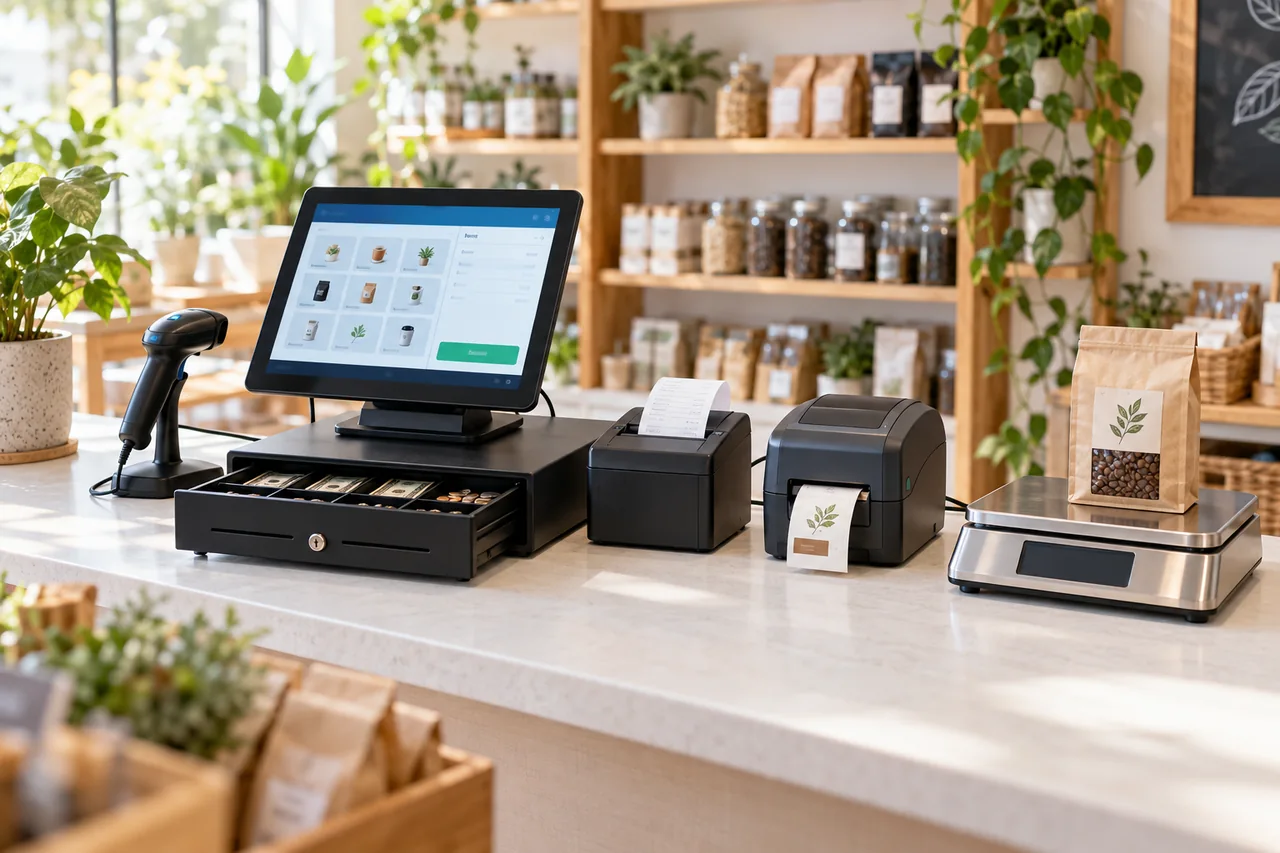
Touchscreen counter workflows for products, orders and checkout.
Configure drawer opening and cash handling within the checkout workflow.
Scan product barcodes for item selection and stock checks.
Print checkout receipts, order tickets and kitchen tasks.
Print product barcodes, prices and packaging labels.
Connect weight readings with product pricing workflows.
Share your device models and connection types to plan integration. Unsupported peripherals can receive free custom integration under an agreed scope.
Discuss branded channels and hardwareSupport Tailored Customization. Share Your Industry, Store Count, and Business Needs to Learn About Suitable Features, Delivery Methods, and Pricing.