
Branded mini programs
Tailor the brand interface and connect products, ordering and loyalty services, with QR and sharing access.
 AllinWebPOS
Suitable for multi-store businesses needing shared management rules, coordinated procurement/replenishment, and unified operational reporting.
Observe Real Tasks in Stores, Then Evaluate How Customers, Staff, and Managers Hand Off Responsibilities

Stores submit requests, headquarters confirms scope, warehouses prepare goods per transfer records—ensuring shipped and received quantities are verifiable.
Every transfer must track recipient, items shipped, and quantity received.
Organize specific products, specifications, and quantities based on sales and inventory.
Confirm Shipment Arrangements Based on Store Scope and Approval Roles.
Pick, Verify, and Record Sent Quantities Based on Transfer Records.
Verify received specifications and quantities; document discrepancies and assign handling.

Express requirements via product, quantity, and store scope; maintain clear records of requests, approvals, shipments, and receipts.
Restocking triggers shift from chat messages to queryable business records.
Organize replenishment requests by product specs and quantities.
Headquarters and store managers confirm requests according to roles and authorization scope.
Cross-Check Items and Transfer Records to Verify Sent and Received Quantities.
Verify inventory changes and variances using sales, receipts, and counts.

Clarify role permissions, business rules, and handover responsibilities step-by-step, starting from counter operations, inventory, and daily closing tasks.
Clarify Business Rules Before Integrating Systems into Daily Use
List actual requirements for cashiering, returns/exchanges, restocking, and daily closing.
Confirm store scope, role permissions, and approval responsibilities.
Configure features and workflows based on devices, channels, and deployment methods.
Drill with typical orders and inventory tasks to confirm role handoffs.
Chain operations require unified product codes, clear store-warehouse relationships, and defined headquarters and store manager permissions and approval responsibilities. AllinWebPOS organizes store management, requisitioning, replenishment, member benefits, and operational reports to help headquarters establish consistent metrics while enabling stores to maintain daily service rhythms.
Centrally view sales, daily settlements, income/expenses, and approvals; configure permissions per headquarters and store roles for traceable management.
Explore FeaturesUnify product specifications and barcodes to link procurement, receiving, counting, and store requisitions; verify every inventory change.
Explore FeaturesExtend automation, printing devices, and online channel services as needed, beginning with the Store Setup Wizard, industry configurations, and plugins.
Explore FeaturesUnderstand product applications through common operational scenarios.
Customize functions, interfaces, and system integrations based on industry workflows, store size, and management methods, combining SaaS or private delivery to meet diverse client needs.
Gather your requirements first, then confirm the customization scope, quote and delivery plan. Free custom integration is available for peripheral connections that are not yet supported.
Connect branded mini programs, apps and WhatsApp Business to bring product browsing, ordering and customer service to the channels your customers use.

Tailor the brand interface and connect products, ordering and loyalty services, with QR and sharing access.
Customize and integrate your own app for products, orders and member services in a branded mobile experience.
Connect the official WhatsApp Business API for product enquiries, order notifications and after-sales conversations.
WhatsApp Business services are configured around your business account, customer consent and official message-template rules.
Integrate POS terminals, cash drawers, scanners, receipt printers, label printers and scales to connect scanning, weighing, checkout and printing.
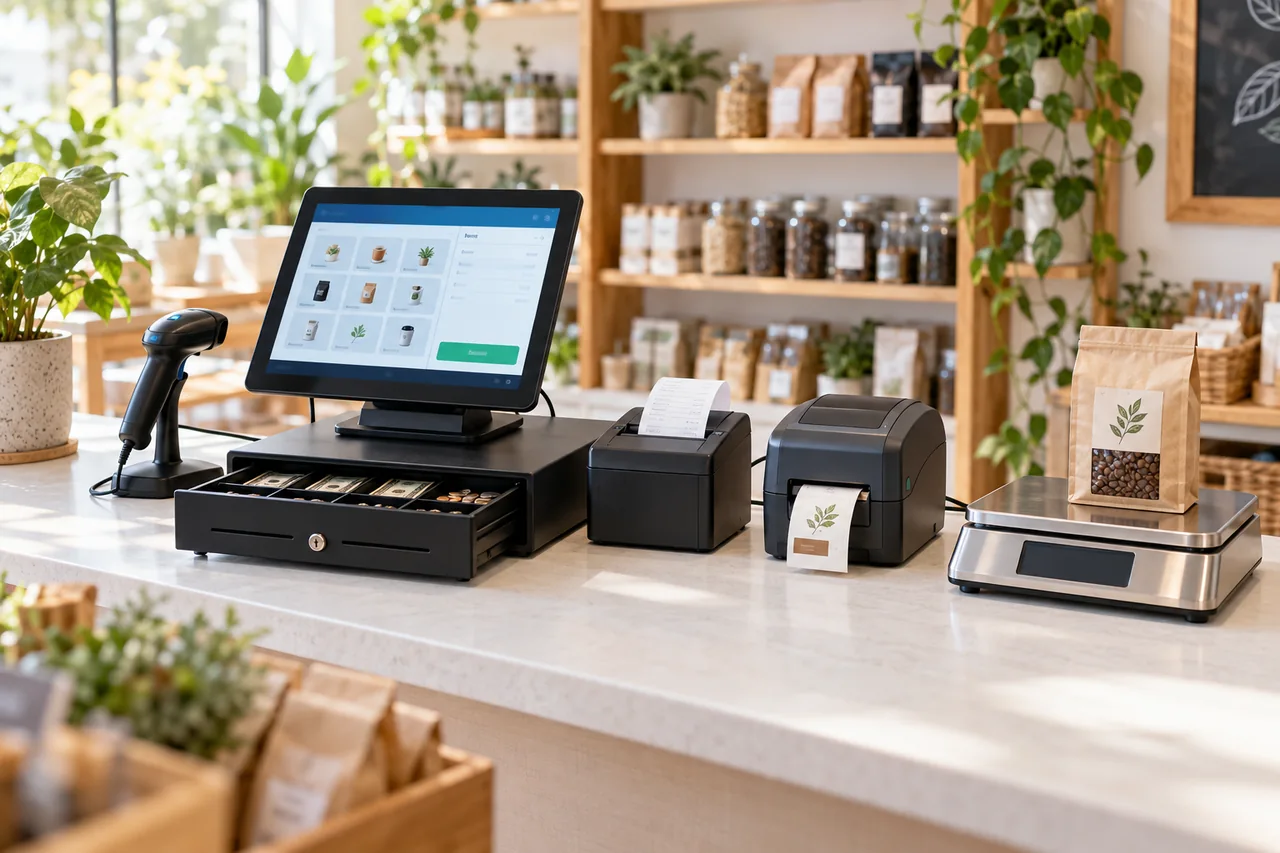
Touchscreen counter workflows for products, orders and checkout.
Configure drawer opening and cash handling within the checkout workflow.
Scan product barcodes for item selection and stock checks.
Print checkout receipts, order tickets and kitchen tasks.
Print product barcodes, prices and packaging labels.
Connect weight readings with product pricing workflows.
Share your device models and connection types to plan integration. Unsupported peripherals can receive free custom integration under an agreed scope.
Discuss branded channels and hardwareSupport Tailored Customization. Share Your Industry, Store Count, and Business Needs to Learn About Suitable Features, Delivery Methods, and Pricing.